


My Rush
4.2111.00 Reviews
App Specs
- Version
- 1.6.2
- Updated On
- License
- Free
- Downloads
- 10,000+
- Developer
- Rush University System for Health
- Categories
- Medical
- Platform
- Android
Screenshots
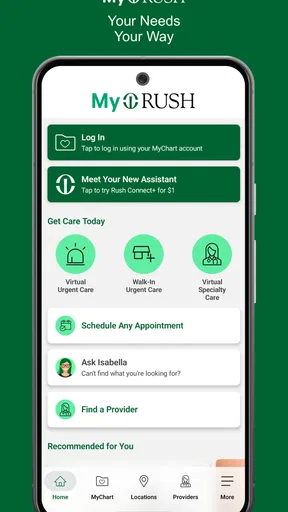
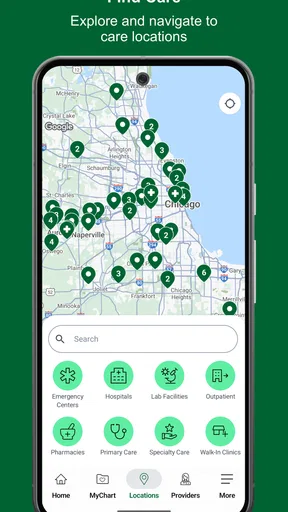
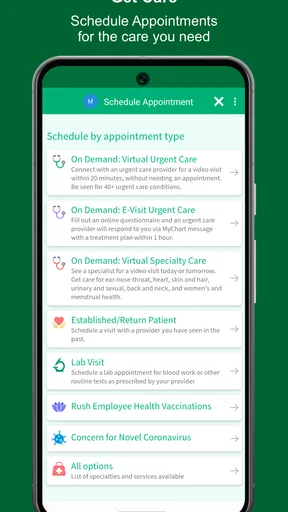
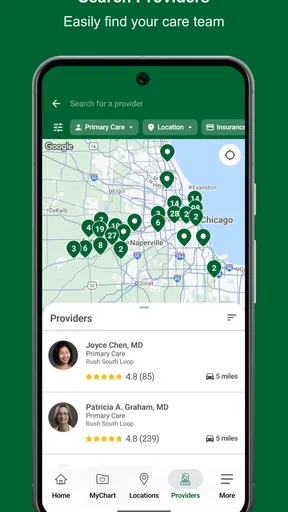
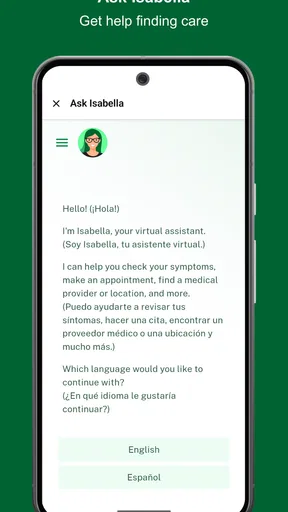
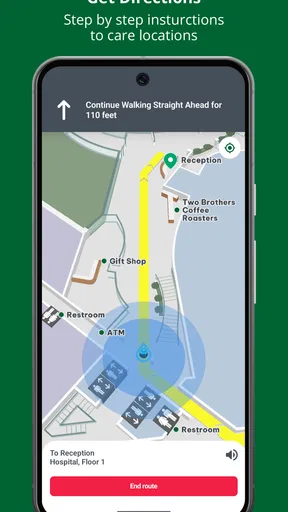
 Analysis by AppCompare
Managing healthcare often means jumping between phone calls, paper notes, appointment reminders, and separate online services. My Rush is designed to bring that work into one mobile place for people connected with Rush University System for Health. I found its strongest appeal in that simple idea: instead of treating a medical app as a digital brochure, it aims to make routine healthcare tasks easier to reach from a phone.
This is a free medical app from Rush University System for Health, with a Teen content rating and support for devices running iOS 11 or later. It was released on March 12, 2025, and the current version is 1.6.2. The store summary, “Manage your healthcare,” is brief, but it points to the app’s practical role rather than suggesting that it replaces a doctor, urgent care, or emergency services.
After spending time with it, I see My Rush as a convenience tool first. Its value depends heavily on whether Rush is already part of your care. If it is, having healthcare-related access in a dedicated app can reduce small bits of friction. If your doctors and records are outside the Rush system, the app becomes much less useful, no matter how polished the experience feels.
How My Rush fits into everyday healthcare
The important distinction is between a healthcare management app and a medical advice app. My Rush belongs to the first group. I would use it to stay organized around care, not to diagnose a symptom or decide whether something serious can wait. That boundary matters because a convenient account dashboard can feel reassuring, but it is not a substitute for professional evaluation.
The app’s audience is naturally tied to Rush patients and families. A person with recurring appointments, ongoing treatment, or several healthcare tasks may appreciate having a single starting point on a phone. It can also be useful for someone who helps a family member keep track of care, provided the account and access arrangements are appropriate for that situation.
One everyday scenario shows where the app makes sense. Imagine that I have a follow-up visit coming up after a busy week and do not want to search through email, handwritten notes, or a browser bookmark. I can open the Rush app as my healthcare starting point, review what I need to handle, and prepare my questions before contacting the appropriate part of the health system. That preparation is a small benefit, but it is exactly the kind of repeated task a dedicated app can simplify.
I also like the idea of separating healthcare from general phone clutter. A calendar can remind me that something is happening, but it does not necessarily give me the healthcare context around that task. A notes app can store questions, but it does not become a meaningful care-management home. My Rush is more focused than those ordinary tools, which is its main reason to exist.
Worth Reading Before You Choose

Flipboard Shows What News Apps Must Do Beyond the Feed

Switching to Android Auto Means Rethinking Your Driving Routine

Google Calendar Makes a Crowded Week Easier to Manage

Ludo King Makes the Most of the Minutes Between Plans

Baby Panda World Brings Quick Play to Modern Phones, but Its Game Library Feels Busy

ESPN’s Live Game View Makes Following Close Games Easier
What the free price really means
My Rush is free to download and use as an app. That makes the decision straightforward from a purchase perspective: there is no listed upfront price to weigh against the features. For someone already receiving care through Rush, the practical value comes from saving time and keeping access closer at hand, rather than from buying an entertainment product or a premium subscription.
Free access does not automatically make every healthcare app valuable. The real question is whether it connects to the care relationship I already have. If I am not a Rush patient, or if the people who manage my care use another health system, I would not install it merely because it costs nothing. The download is free, but my time is still a cost, and an app that does not fit my healthcare arrangements will not repay that effort.
I would also avoid treating the free price as a promise that every healthcare need is handled inside the app. Medical visits, treatments, prescriptions, tests, and other services remain part of healthcare itself. The app’s role is organizational and access-oriented. That is useful, but it should not be confused with free medical care or unlimited support.
For families, the value calculation is slightly different. A parent or caregiver may benefit from having a repeatable place to begin when dealing with Rush-related tasks. However, access to another person’s healthcare information is a sensitive matter, so I would set up and use accounts carefully rather than assuming that one phone should automatically contain everyone’s details. Convenience is helpful only when it does not create confusion about whose care is being managed.
Where the app delivers practical value
The strongest benefit is reduced searching. Healthcare information is often scattered across messages, calendars, paper instructions, and different websites. A Rush-specific app gives me a clearer mental shortcut: when the task concerns my Rush care, I know which app to open first. That kind of consistency becomes more valuable when healthcare is recurring rather than occasional.
Another useful benefit is preparation. Before an appointment, I can use the app as a prompt to think through what I need to ask, what has changed since the last visit, and which follow-up tasks deserve attention. I would still keep personal notes when necessary, but the app can serve as the central place that reminds me to prepare instead of arriving with a vague sense that I forgot something.
For people who dislike making phone calls for every minor administrative question, a digital healthcare channel can feel less disruptive. It lets me begin with the information already associated with my care, rather than explaining the entire situation from scratch to a general search engine or a separate service. That does not remove the need for staff or clinicians, but it can make routine interactions feel more structured.
The app may also help people who are comfortable with smartphones but do not want to manage healthcare through a desktop browser. A phone is usually close by, and a dedicated icon is easier to remember than a long chain of browser tabs. This is especially helpful for users who check healthcare information in short moments, such as while commuting, waiting for an appointment, or organizing the week at home.
Still, I would describe the benefit as convenience rather than transformation. My Rush does not make healthcare simple in every respect. It can give me a better doorway into Rush services, but the underlying healthcare process can still involve waiting, decisions, paperwork, and communication with real people. That honest expectation makes the app more useful because I am not asking it to solve problems it was never meant to solve.
Three habits that make it more useful
First, I would make the app part of a single preparation routine instead of opening it only when something goes wrong. A few minutes before a planned visit, I would check the app, write down questions separately if needed, and confirm what I need to remember. This turns it from a passive shortcut into an active part of managing care.
Second, I would use it as the first stop for Rush-related tasks, but not the only stop. If an issue is urgent, confusing, or medically serious, I would use the appropriate clinical or emergency channel rather than waiting for an app workflow. The useful trade-off is speed for ordinary organization; the wrong trade-off would be using digital convenience in place of urgent judgment.
Third, I would keep my account habits disciplined. Healthcare apps deserve more attention than ordinary shopping or social apps because the information involved is personal. I would avoid leaving the app open on a shared device and would make sure I understand which account I am using before reviewing or managing care. This is not a flashy feature, but it is an important part of using a medical app responsibly.
Trade-offs and points of friction
The biggest limitation is ecosystem dependence. My Rush can be valuable when Rush is central to my healthcare, but it is not a universal organizer for every doctor, clinic, or hospital I use. If my care is split among several unrelated systems, I may still need other portals and apps. In that situation, this app can reduce friction in one part of my healthcare without removing the larger fragmentation.
That also affects people who change providers. A healthcare app is most useful when it matches an active relationship. If I move away from Rush or receive only occasional care there, the reason to keep the app installed may become weaker. This is not a flaw unique to My Rush; it is the normal trade-off of institution-specific healthcare tools. A broad health-record solution may be more convenient for someone whose care is spread across different organizations.
There is also a learning curve, even when an app is intended to be simple. Healthcare terms and account steps can be stressful when I am tired, unwell, or helping someone else. A user who is not comfortable with digital accounts may still prefer a phone call or in-person assistance. I would not recommend forcing the app on a family member who finds mobile healthcare confusing; the best tool is the one that helps them complete the task accurately.
Another trade-off is expectation management. Because the app places healthcare access on a phone, I might expect immediate answers or instant resolution. That expectation can lead to frustration if a request still requires staff review or if a clinical question needs a proper appointment. I found it more sensible to judge the app by how well it organizes access, not by whether it eliminates waiting or replaces human communication.
People who want symptom checking, medication education, exercise coaching, or a broad wellness dashboard may also find that a healthcare-management app is the wrong category for their needs. My Rush is better suited to interacting with a particular health system than to serving as an all-purpose health companion. Choosing a specialized tool over a general one is worthwhile only when the specialization matches my situation.
Who should install it
I would recommend My Rush to current Rush patients who want a more convenient mobile route into their healthcare. It is especially sensible for people with regular appointments, ongoing care, or a preference for handling routine organization from a phone. The free cost removes the financial barrier, while the dedicated focus can make repeated tasks easier to remember.
I can also see value for caregivers and family members who help coordinate Rush-related healthcare. The app may give them a more consistent starting point than scattered reminders, but I would still treat account access and personal information carefully. The convenience is real only when the arrangement is authorized and clear to everyone involved.
It is less compelling for someone who rarely interacts with Rush, uses a different health system, or already has a reliable method for managing all care through another portal. In that case, installing another app may create one more place to check rather than simplifying anything. I would also suggest skipping it as a primary tool if the user is looking for emergency guidance, diagnosis, or general medical education.
The Teen content rating makes the app suitable for a broad teen-and-adult audience in terms of store classification, but that does not remove the need for an appropriate account and responsible handling of health information. A younger user may still need help understanding healthcare steps, especially when appointments or treatment decisions are involved.
Performance context and release maturity
The current version is 1.6.2, which tells me the app has already moved beyond its initial release stage, while still being a relatively new option following its March 12, 2025 launch. I would keep it updated through the official app store because healthcare apps can depend on ongoing maintenance and compatibility work. I would also check that my phone meets the iOS 11 minimum before planning to use it.
Its average rating is 4.2 from around two hundred ratings, with just over one hundred written reviews. I read that as encouraging but not conclusive. It suggests that many users find the app worthwhile, yet the sample is not large enough for me to treat the rating as a guarantee that every patient will have the same experience. The more important question remains whether Rush is the system I need to manage.
The install count is over ten thousand, which fits a focused healthcare app serving a particular health system rather than a mass-market social or entertainment product. I would not judge it negatively for that narrower reach. In this category, relevance to the right patient matters more than popularity among people who have no reason to use Rush.
My final choice: use it when the relationship fits
My Rush earns its place as a free, focused healthcare-management app for people connected with Rush University System for Health. I like its practical purpose and the way it can turn a phone into a more direct starting point for routine care organization. The best value comes from repeated use: preparing for appointments, keeping healthcare tasks in one familiar place, and reducing the need to search through unrelated tools.
I would not call it an essential app for everyone, and I would not install it simply because it is free. If Rush is not part of my care, another portal or broader organizer would be a better choice. If I need urgent medical help or clinical advice, I would use the appropriate professional channel instead of expecting a management app to answer those needs.
My recommendation is simple: install My Rush if you actively use Rush healthcare and want a convenient mobile companion; skip it if your care belongs elsewhere. Its value is not in flashy extras or a promise to replace the healthcare system. It is in making the Rush relationship easier to reach, easier to prepare for, and a little less scattered during ordinary weeks.
For me, that is a worthwhile use of a free app. The deciding factor is not the download price, the rating, or the number of people who have installed it. It is whether opening My Rush genuinely shortens the path between me and the Rush care I already receive. When the answer is yes, the app is a sensible addition to my phone; when the answer is no, leaving it out is the more organized decision.
Pros
- Quick
- simple gameplay that is easy to understand from the first round.
- Short sessions make it convenient for quick breaks or casual play.
- Responsive controls help the game feel smooth on compatible devices.
- Bright visuals and lively effects keep the presentation engaging.
- Progression gives players a reason to return and improve their results.
Cons
- Gameplay may become repetitive after extended sessions.
- Difficulty can increase quickly and feel frustrating for new players.
- Some devices may experience occasional lag during busy scenes.
- The game may rely heavily on ads between rounds or attempts.
- Limited depth may disappoint players looking for a more complex experience.
FAQs for My Rush
What is My Rush, and how does the app work?
My Rush is a mobile application designed to provide users with a convenient way to access and manage its available services from an Android or iOS device. After installing it, you can create or sign in to an account, browse the main sections, review the available options, and use the app’s features through its mobile interface. The exact experience may vary depending on your location and account type.
Is My Rush free to download and use?
My Rush can generally be downloaded without an upfront installation fee, but some services or features may require payment, a subscription, or an in-app purchase. Before confirming any transaction, carefully review the displayed price, billing frequency, and renewal conditions. Availability and pricing can differ between Android and iOS, as well as by country, so checking the official store listing is recommended.
What information is required to create a My Rush account?
Depending on the version and services you use, My Rush may request details such as your name, email address, phone number, location, or payment information. Some features may also require account verification. You should review the app’s privacy policy before registering so you understand how your data is collected, stored, and shared. Avoid entering sensitive information unless it is clearly necessary.
Does My Rush require an internet connection or access to location services?
My Rush is primarily intended to work with an internet connection, since many of its features depend on current account, service, or content information. Certain functions may also request permission to use your location, notifications, camera, or other device features. These permissions should be granted only when needed. You can usually manage or revoke them later through your Android or iOS settings.
Is My Rush safe to install on Android and iPhone?
The safest way to install My Rush is through the official Google Play Store or Apple App Store, where the application listing, developer information, permissions, and updates can be checked. Keep your device’s operating system updated and avoid unofficial APK files or unknown download links. As with any app, read recent user reviews and examine the privacy terms before creating an account or making payments.


